Showing posts with label photoshop. Show all posts

Sunday, September 6, 2015

5 Favorite (and free) creative font pairings

I LOVE fonts. I love Photoshop. I love combing various fonts together for customized and cool looks.
I have used this to create watermarks for my photos, I have used this to make address labels, I have used this to make letters/newsletters and other things "pop". I have used this in all aspects of my creative life.

Unsure about who what when where why or how??  Here are a few basic "rules" for combos:
1. Opposites attract.  If you Have  a thick and heavy font, try pairing it with something light and airy.
2. Girly scripts go really well with basic text fonts
3. All caps go well with lower case
4. Big and bold + small and delicate= amazing


Here are 5 totally adorable font pairings that you can use. All of these fonts are FREE and available on Dafont.


ENJOY!!

Sunday, February 15, 2009

photoshop(again)

About a year ago I came into possession of Photoshop CS3. It has been so much fun and I recently discovered ACTIONS. Basically you can create different effects on Photoshop, save the whole step by step in a file and just press play to do them on any photo of your choosing. So instead of having to go through layer by layer, adding various filters and whatnot, you can just hit one button and it does it for you.
You can even record actions and share them with others.
So here is my first foray into the world of "action sharing" This action that I am sharing is a Vintage Photo Effect.

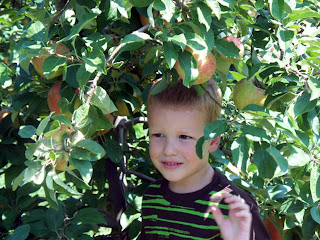
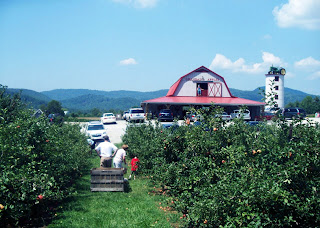
Here are the two originals from our Apple Picking Excursion to Granddads Apples in Hendersonville, NC.


Here are the same photos after this action:

There are lots of "vintage photo" tutorials out there, but I wasnt happy with any single one. So I took a few elements from some of the best and combined it to make this action.

You can Download the action here. (it is on a free file storage so you may be asked to wait 10 to 30 seconds before downloading.)

just download it to a file thats easy to find. Then go into Photoshop and open WINDOW>ACTIONS. A small box will pop up and in the top right corner is a tiny down arrow. Click on this and go to LOAD ATIONS. Just choose your file and voila.

TO USE:

Open a picture of your choosing. Go to WINDOW>ACTIONS and click on the little arrow next to Vintage Effect. Click on Vintage photo and press the play button at the bottom of the actions box.

At the end of your completed action you can go to IMAGE>ADJUSTMENTS>BRIGHTNESS/CONTRAST and play with the sliders until you get it to just the right proportions.

I dont think that this will work on Photoshop Elements. You can try. If you dont have photoshop you can download a free 30 day trial here. (you willneed to create a free ccount with Adobe. It is their new CS4 version too!)

this makes a great action for retro style digital scrapbooks.

enjoy!

Sunday, February 8, 2009

My newest photoshop trick


Ok so I am TOTALLY an idiot and never realized I could do this with Photoshop.
I should have known I could, but for some reason i didnt have my "aha" moment until today.
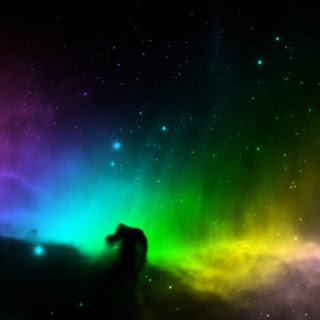
This is the Horsehead Nebula. I made it on CS3 with 2 tools and 20 seconds of time.

All I used was a rainbow gradient and a special brush that I downloaded for free HERE. (Then I loaded the brushes to my brush library.)

Super Easy.


So for those of you who are still playing with Photoshop, here is a quick and easy tutorial...(and for those of you already past this easy stage, WHY DIDNT YOU LET ME KNOW A YEAR AGO I COULD DO THIS??)
FOR THE PHOTOSHOP CHALLENGED:
start with a new document, size of your choosing, (this is a 6x6 with 72 resolution in RGB mode )
I picked a rainbow gradient and filled the background with the gradient.
Then I opened a new layer on top of it and filled it with black.I went to my brushes and pulled up the Horsehead nebula brush, made it the size I wanted and set mode to CLEAR. So then when I positioned it to where I wanted It, I clicked and voila, the brush burned through the black, down to the rainbow gradient underneath.

I NEVER KNEW I COULD DO THIS!!! I have totally been doing everything the hard way.
How long have I had photoshop and been playing around with it?? Forever. Why did it take me this long to figure out this trick?? No idea. It isnt in any of those tutorials. I guess it is one of those things that everyone should know, so they dont bother to tell you how to do it because they think you would already know how to do it.
I spent the weekend playing with my new brushes and patterns and finding out new and fun things I could do. It is amazing!!
Here are some places you can go to download brushes, patterns and gradients. most are in zip files so you will need to extract them before loading.


those were just two other things I did. I had a super fun time playing.
So hopefully I was able to teach someone out there a new trick and save them the same frustration I had.
Really I am a smart woman, sometimes it takes me longer to figure out things that everyone else already knows.

Wednesday, September 3, 2008

Mad about Plaid

The other day I was on Cicada Daydream She used to be in the mens underwear business and had a tutorial for photoshop about how to make plaids.
So I downloaded her .psd file and went to town.

It is actually A LOT of fun.


These are just a few I came up with. I am trying to come up with a few for my new Lip Balm labels.

If you have Photoshop, definately check out the tutorial. It is awesome and you will not believe how much time you will spend sitting at your computer creating plaids!!

Thanks Michelle for sharing!!

Wednesday, February 13, 2008

Photoshop, redux

As many of you know from a previous post I recenly became the proud new parent of Photoshop. Since then I have had fun playing and learning new things, rabidly reading my Photoshop CS3 bible, online tutorials of fun effects and etsy Storque articles. i THINK I can do a pretty basic banner that doesnt suck, actually. For being a beginner, I feel pretty confident that these are halfway decent.

However, in comparison to other banner makers on etsy I feel VERY out of my league to be quite honest. They are Rembrandt, I am some guy painting in his attic.
But practice makes perfect. I have been able to learn new skills with every chapter in my books, with every new tutorial. check these out:

This is the Aquarel Effect. It looks like a painting on canvas that has the foggy edges. I thought it was pretty cool.
I found that in an online tutorial. It was fairly simple to do, although to be quite honest I dont know what I would do with it in the real world

Kind of impractical I guess. But hey, a cool new skill.


This is the title to my blog. I did that using a pink gerbera daisy clip art and a watercolor effect using verious layers and filters.


This is an Old Timey type photo, complete with self made striping and noise and filters etc.
I think I could have a lot of fun with that, maybe re-doing some of my pictures from Paris in it. Make it look old retro vintag-y. (is that a word?)


So I have really enjoyed my photoshop the past few weeks. I never realized just how much you could do with it.
you can download a free trial HERE. It is for 30 days. If you like it, you can purchase it for a tiny fraction of the price at Amazon.com. (NEVER pay full price kids. NEVER)
There are all sorts of online tutorials , just google free photoshop tutorials.
I have found the Photoshop CS3 Bible to be helpful as well as Photoshop for photographers.(Thank you for all the recommends friends!!)
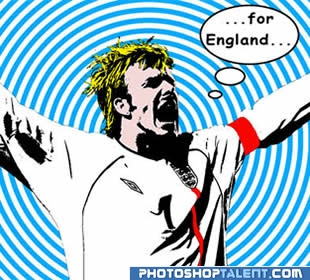
This morning I am going to "Pop Art" a picture of my son, kind of like this:

(Obviously thats not MY picture. My attempts, I am quite positive, will look like Sesame Street on Crack.)
Viva la Photoshop!

Day trip from Boise- Hells Canyon and Dam , and Owyhee Reservoir

"Hells Canyon, North America's deepest rover gorge, encompasses a vastly remote region with dramatic changes in elevation, terrain,...