So I adore photoshop. I found a bunch of actions on deviantart and have really enjoyed this spring.
I love photographing flowers and trees , ivy, grasses etc.Here is what i have done with some of my favorite photoshop actions.

Showing posts with label Photoshop actions. Show all posts
Showing posts with label Photoshop actions. Show all posts
Wednesday, April 21, 2010


Sunday, February 15, 2009
photoshop(again)
About a year ago I came into possession of Photoshop CS3. It has been so much fun and I recently discovered ACTIONS. Basically you can create different effects on Photoshop, save the whole step by step in a file and just press play to do them on any photo of your choosing. So instead of having to go through layer by layer, adding various filters and whatnot, you can just hit one button and it does it for you.
You can even record actions and share them with others.
So here is my first foray into the world of "action sharing" This action that I am sharing is a Vintage Photo Effect.
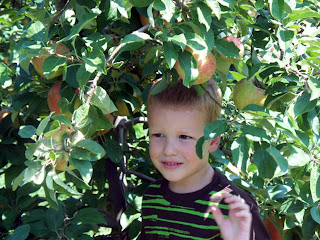
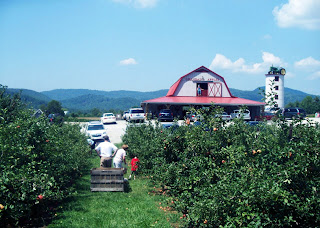
Here are the two originals from our Apple Picking Excursion to Granddads Apples in Hendersonville, NC.
Here are the same photos after this action:

There are lots of "vintage photo" tutorials out there, but I wasnt happy with any single one. So I took a few elements from some of the best and combined it to make this action.
You can Download the action here. (it is on a free file storage so you may be asked to wait 10 to 30 seconds before downloading.)
just download it to a file thats easy to find. Then go into Photoshop and open WINDOW>ACTIONS. A small box will pop up and in the top right corner is a tiny down arrow. Click on this and go to LOAD ATIONS. Just choose your file and voila.
TO USE:
Open a picture of your choosing. Go to WINDOW>ACTIONS and click on the little arrow next to Vintage Effect. Click on Vintage photo and press the play button at the bottom of the actions box.
At the end of your completed action you can go to IMAGE>ADJUSTMENTS>BRIGHTNESS/CONTRAST and play with the sliders until you get it to just the right proportions.
I dont think that this will work on Photoshop Elements. You can try. If you dont have photoshop you can download a free 30 day trial here. (you willneed to create a free ccount with Adobe. It is their new CS4 version too!)
this makes a great action for retro style digital scrapbooks.
enjoy!
Subscribe to:
Posts (Atom)
Day trip from Boise- Hells Canyon and Dam , and Owyhee Reservoir
"Hells Canyon, North America's deepest rover gorge, encompasses a vastly remote region with dramatic changes in elevation, terrain,...

-
 Here are the photos as promised of my latest creation. I have been so good the past few years about not wrecking my hair. Then I wrote a po...
 -
 If your old potholders are anything like mine, it is time to throw out those manky old boys and step into some new pre...
 -
 A few months ago I was scouring Pinterest for kitchen storage and pantry ideas, and I saw a GREAT post about an IKEA Pax Wardrobe used for ...